eNSP模拟器DHCP中继

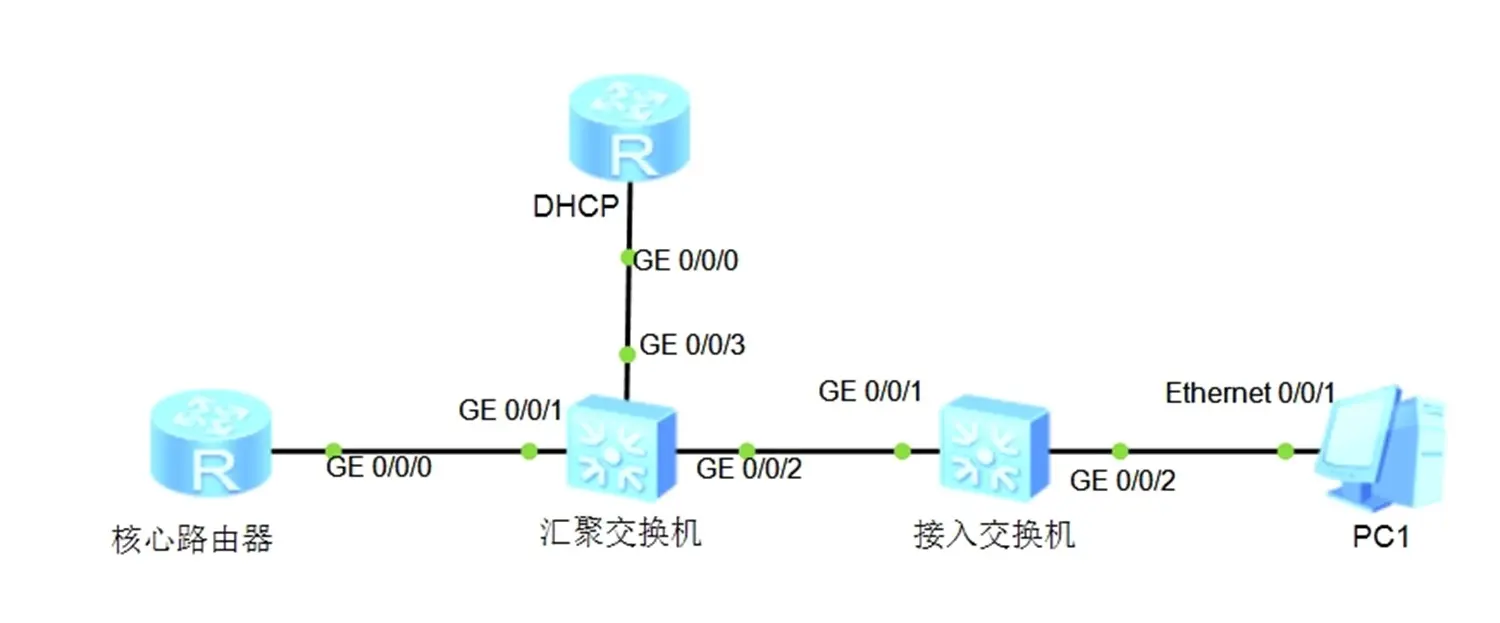
拓扑图

image.png

设备规划

1台DHCP交换机+1台汇聚交换机+2台接入交换机+2台PC

设备名称 接口 VLAN IP地址/子网 角色 备注
SW1 Vlanif10 10 192.168.10.254/24 DHCP中继 转发 VLAN 10 的 DHCP 请求
Vlanif20 20 192.168.20.254/24 DHCP中继 转发 VLAN 20 的 DHCP 请求
Vlainif100 100 192.168.100.2/24 IP地址 与DHCP服务器通信接口IP地址
GE0/0/24 - - 连接SW2 用于与 DHCP 服务器通信
SW2 Vlanif100 100 192.168.100.1/30 DHCP服务器 提供 DHCP 服务
GE0/0/24 - - 连接SW1 用于与 DHCP 中继通信
LSW1 Ethernet0/0/1 10 - 连接PC1 接入 VLAN 10(不做配置)
LSW2 Ethernet0/0/2 20 - 连接PC2 接入 VLAN 20(不做配置)
PC1 Ethernet0/0/1 10 DHCP获取 客户端 通过 VLAN 10 获取 IP 地址
PC2 Ethernet0/0/1 20 DHCP获取 客户端 通过 VLAN 20 获取 IP 地址

在 SW1 上配置 DHCP 中继

创建 VLAN 并开启 DHCP

1
2
3
<SW1> system-view
[SW1] vlan batch 10 20 100
[SW1] dhcp enable

配置接口加入 VLAN

1
2
3
4
5
6
7
8
9
10
11
12
13
14
15
16
17
# VLAN 10 配置
[SW1] int g0/0/1
[SW1-GigabitEthernet0/0/1] port link-type access
[SW1-GigabitEthernet0/0/1] port default vlan 10
[SW1-GigabitEthernet0/0/1] q

# VLAN 20 配置
[SW1] int g0/0/2
[SW1-GigabitEthernet0/0/2] port link-type access
[SW1-GigabitEthernet0/0/2] port default vlan 20
[SW1-GigabitEthernet0/0/2] q

# 连接DHCP服务接口配置,如果是多vlan则需要设置成trunk
[SW1] int g0/0/24
[SW1-GigabitEthernet0/0/24] port link-type access
[SW1-GigabitEthernet0/0/24] port default vlan 100
[SW1-GigabitEthernet0/0/24] q

配置 DHCP 中继

1
2
3
4
5
6
7
8
9
10
11
12
13
14
15
16
17
18
19
20
21
22
23
# 配置VLAN 10 接口 
[SW1] int Vlanif 10

# 配置接口IP
[SW1-Vlanif10] ip address 192.168.10.254 24

# 配置接口中继
[SW1-Vlanif10] dhcp select relay

# 配置DHCP服务器地址
[SW1-Vlanif10] dhcp relay server-ip 192.168.100.1

# 配置VLAN 20 接口
[SW1] int Vlanif 20

# 配置接口IP
[SW1-Vlanif20] ip address 192.168.20.254 24

# 配置接口中继
[SW1-Vlanif20] dhcp select relay

# 配置DHCP服务器地址
[SW1-Vlanif20] dhcp relay server-ip 192.168.100.1

配置 VLAN 100 的 IP 地址

负责与 DHCP 服务器通信接口 IP 地址

1
2
3
4
5
6
7
[SW1] int Vlanif 100
[SW1-Vlanif100] ip address 192.168.100.2 24
[SW1-Vlanif100] q
[SW1] q

# 保存配置
<SW1> save

在 SW2 上配置 DHCP 地址池

创建 VLAN 并开启 DHCP 服务

1
2
3
<SW2> system-view
[SW2] dhcp enable
[SW2] vlan batch 100

配置 VLAN 100 工作在全局地址池模式

1
2
3
4
5
[SW2] int Vlanif 100
[SW2-Vlanif100] ip address 192.168.100.1 24

# 开启全局模式(如果不开,即使后面配置好了,PC 也是获取不到 IP 地址)
[SW2-Vlanif100] dhcp select global

配置与 DHCP 中继服务器的接口

1
2
3
4
5
6
7
8
[SW2] int g0/0/24
[SW2-GigabitEthernet0/0/24] port link-type access
[SW2-GigabitEthernet0/0/24] port default vlan 100
[SW2-GigabitEthernet0/0/24] q
[SW2] q

#保存配置
<SW2> save

创建地址池并配置

1
2
3
4
5
6
7
8
9
10
11
12
13
14
15
16
17
18
19
20
21
# 创建 VLAN 10 地址池
[SW2] ip pool vlan10
[SW2-ip-pool-vlan10] network 192.168.10.0 mask 24

# 注意这里网关不能用 192.168.10.254, 否则会与之前在 SW1 配置的Vlanif 地址冲突
[SW2-ip-pool-vlan10] gateway-list 192.168.10.253
[SW2-ip-pool-vlan10] dns-list 8.8.8.8
[SW2-ip-pool-vlan10] q

# 创建 VLAN 20 地址池
[SW2] ip pool vlan20
[SW2-ip-pool-vlan20] network 192.168.20.0 mask 24

# 注意这里网关不能用 192.168.20.254, 否则会与之前在 SW1 配置的Vlanif 地址冲突
[SW2-ip-pool-vlan20] gateway-list 192.168.20.253
[SW2-ip-pool-vlan20] dns-list 8.8.8.8
[SW2-ip-pool-vlan20] q
[SW2] q

# 保存配置
<SW2> save

查看路由表

DHCP 中继 和 路由表 是跨网段分配 DHCP 服务的关键

路由表用于决定数据包的转发路径。在跨网段分配 DHCP 服务时,路由是必不可少的。

查看 SW1 路由表

1
2
3
4
5
6
7
8
9
10
11
12
13
14
15
16
<SW1> dis ip routing-table 
Route Flags: R - relay, D - download to fib
------------------------------------------------------------------------------
Routing Tables: Public
Destinations : 8 Routes : 8

Destination/Mask Proto Pre Cost Flags NextHop Interface

127.0.0.0/8 Direct 0 0 D 127.0.0.1 InLoopBack0
127.0.0.1/32 Direct 0 0 D 127.0.0.1 InLoopBack0
192.168.10.0/24 Direct 0 0 D 192.168.10.254 Vlanif10
192.168.10.254/32 Direct 0 0 D 127.0.0.1 Vlanif10
192.168.20.0/24 Direct 0 0 D 192.168.20.254 Vlanif20
192.168.20.254/32 Direct 0 0 D 127.0.0.1 Vlanif20
192.168.100.0/24 Direct 0 0 D 192.168.100.2 Vlanif100
192.168.100.2/32 Direct 0 0 D 127.0.0.1 Vlanif100

查看 SW2 路由表

1
2
3
4
5
6
7
8
9
10
11
12
<SW2> dis ip routing-table 
Route Flags: R - relay, D - download to fib
------------------------------------------------------------------------------
Routing Tables: Public
Destinations : 4 Routes : 4

Destination/Mask Proto Pre Cost Flags NextHop Interface

127.0.0.0/8 Direct 0 0 D 127.0.0.1 InLoopBack0
127.0.0.1/32 Direct 0 0 D 127.0.0.1 InLoopBack0
192.168.100.0/24 Direct 0 0 D 192.168.100.1 Vlanif100
192.168.100.1/32 Direct 0 0 D 127.0.0.1 Vlanif100

这里可以看到SW2并没有去192.168.10.0/24192.168.20.0/24的路由,可以配置一条缺省路由(省事,直接从SW1的g0/0/24转发数据)

配置缺省路由去 SW 1 的路由

1
2
# 下一跳是直连 DHCP 中继的接口 IP 地址
[SW2] ip route-static 0.0.0.0 0 192.168.100.2

测试

设置 PC 的地址为 DHCP 模式

image.png

命令行测试通过 DHCP 获取IP

image.png